
public function destroy_comment($id)<script> // Initialize Prism.js when page loads document.addEventListener('DOMContentLoaded', function() { Prism.highlightAll(); // Add line numbers if needed document.querySelectorAll('pre').forEach((block) => { block.classList.add('line-numbers'); }); }); </script>{$comment = BlogComment::findOrFail($id);$comment->delete();return redirect()->back()->with('success', 'Comment deleted successfully.');}
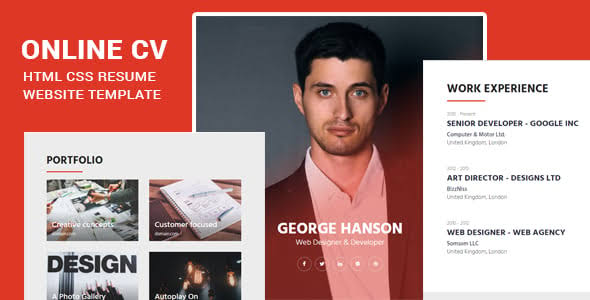
In this article, you will learn how to create a clear and concise resume, with proper division of sections and appropriate style with HTML and CSS. We have discussed how to create a resume using HTML and CSS. The main consideration will be the hierarchy and how such sections would look and function on a professional level online across various devices.
Components of Resume
Each page will consist of a specific section related to the resume, such as −
1: Resume Header
This page will display information such as; your name, job title, and contact details.
2: Summary and Profile Picture
A section that allows a user to post personal information for other users to see together with a section to add a profile picture.
3: Education
Profile of your academic qualification including the degree, the institution, and the year of passing.
4: Experience
I would write down my work experience, internships, and other positions that I have had.
5: Skills and Languages
A list of your other (non-soft) skills, and your ability in other languages.
6: Projects
Explanations of the works have been done, to demonstrate your applicative abilities.
7: Hobbies
Any interest that you have or any hobby that relates to the course you are undertaking.
Final Output
Explore our latest online courses and learn new skills at your own pace. Enroll and become a certified expert to boost your career.
Technology Used
To create the resume, the following technologies will be used −
- HTTP5: The way the layout of the resume was created by the help of such tags as div, header, section tag, <h1>, and p tag.
- CSS: For example to set the style, color, font, and arrange the positions of the text. As for the webpage layering and responsive design, we will use CSS flexbox and grid which will allow us to make the resume accessible both on the computer and on the smartphone, for instance.
HTML Code
HTML Structure
First, use semantic tags to build the structure of a simple HTML page with links. They are the header, profile, education, experience, skills, and projects sections of the resume.
Header Section
Begin with the <header> element to input your name, employer, and position, as well as the email, phone number, and social network accounts.
Profile Section
To do this, using a img tag, post a profile picture and then, in the <p> tag, introduce yourself briefly.
Education Section
Educational background should be presented in the following way: List your education using div element for each of them. The following information about the candidate should be provided in this section; degree, name of the institution, and the study period.
Experience Section
Here, combine your job title, the company’s name, and the period of working in every position in your work experience. Employ ul tag in case of listing the main responsibilities or important results.
Skills Section
Employ the bar diagram to display the efficiency of various technologies available in the modern world. These can be styled with CSS width properties having labels that represent varying skills of their holder.
Project Section
The applicant should provide details of his or her projects. Provide project names as headings and subtopics as the headings, ensuring you elaborate on technologies engaged in OTA and difficulties encountered.
Hobbies Section
Lists Let’s use lists to represent your hobbies by using <ul> and li tag while making sure the hobbies are inline with your career path or self-improvement goals.
CSS Styling
It is preferable to set font family, color, and padding for the layout in CSS. It is noteworthy to consider that CSS Flexbox or Grid will guarantee the layout will be responsive.
Final Touches
Append Media Queries for contrast checking in order to make a resume correctly displayed on mobile devices. Check how the layout looks in other resolutions in order to see the quality on
Conclusion
Following the guide that has been provided in this article, you can come up with a nice, attractive, and professional resume using HTML and CSS. This is helpful since it enables you to design your resume from scratch, letting you make great stands in the digital platforms. Furthermore, the use of the responsive design means that your resume can easily be viewed across different devices and this makes for improved user experience.

Leave A Reply
Your email address will not be published. Required fields are marked