

2nd Oct 2026
How to Build an Attractive Resume Using HTML and CSS (Free Code Included)
As a developer, your resume isn't just a document that lists your experience—it’s often the very first piece of code a recruiter or engineering manager sees from you.
While PDF builders like Canva or Word get the job done, crafting your resume using pure HTML and CSS offers unmatched advantages:
-
Complete Customization: Full control over typography, spacing, grid layouts, and color palettes.
-
Live Hosting: Easily publish your resume on platforms like GitHub Pages, Vercel, or Netlify with a custom domain.
-
A Showcase of Core Skills: Demonstrates clean semantic markup and modern CSS layout techniques (Flexbox and Grid).
Here is a step-by-step breakdown of how to design an attractive, modern, and professional resume using plain HTML and CSS.
Key Design Principles for a Modern Developer Resume
Before diving into code, let's look at what makes a web-based resume stand out to hiring managers without looking cluttered:
-
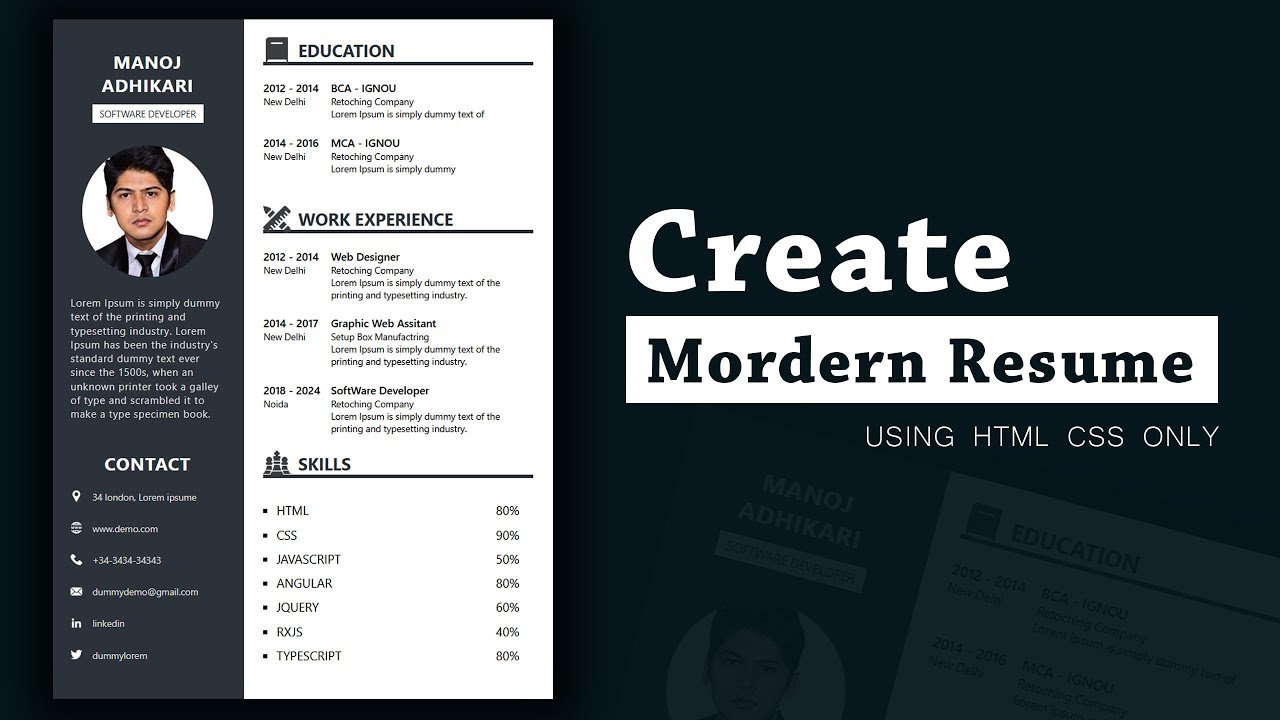
Two-Column Layout: Use CSS Grid or Flexbox to create a distinct sidebar for contact details, technical skills, and education, leaving the main content area focused on work experience and key projects.
-
Subtle Color Palette: Stick to modern, low-contrast neutral darks (like
#0f172afor headers) paired with a clean accent color (like#2563ebblue) to direct focus naturally. -
Typography and Hierarchy: Clean sans-serif fonts (e.g., Inter, Roboto, or System UI) with distinct weight variations (
400body text,600titles,700headers) enhance scannability. -
Print & PDF Readiness: Use CSS
@media printqueries so that when someone clicksCtrl + P/Cmd + P, background artifacts hide automatically, yielding a perfect single-or-two-page PDF.
Core HTML Structure: Semantic Markup
Semantic HTML structure ensures your resume is accessible and clean. Here is the foundational framework:
HTML
<div class="resume-container">
  <!-- Sidebar Section -->
  <aside class="sidebar">
    <div class="profile-section">
      <h1 class="name">Your Name</h1>
      <p class="role-title">Full-Stack Web Developer</p>
    </div>

    <!-- Contact Info -->
    <section class="contact">...</section>

    <!-- Skills -->
    <section class="skills">...</section>
  </aside>

  <!-- Main Content Area -->
  <main class="main-content">
    <section class="summary">...</section>
    <section class="experience">...</section>
    <section class="projects">...</section>
  </main>
</div>
Modern CSS Techniques Used
To keep the template responsive and clean without relying on external UI libraries (like Bootstrap or Tailwind), we leverage standard modern CSS features:
1. CSS Custom Properties (Variables)
Centralizing colors and structural metrics in CSS variables makes customizing or toggling dark mode trivial:
CSS
:root {
  --primary-color: #0f172a;
  --accent-color: #2563eb;
  --text-main: #334155;
  --bg-sidebar: #f8fafc;
  --border-color: #e2e8f0;
}
2. Layout Alignment with CSS Grid
Dividing the layout into a 280px sidebar and a fluid main content container using CSS Grid:
CSS
.resume-container {
  display: grid;
  grid-template-columns: 280px 1fr;
  max-width: 900px;
  background: #ffffff;
  border-radius: 12px;
  overflow: hidden;
}
3. Print Optimization with Media Queries
When recruiters want to save a PDF copy, standard browser print margins can distort web styling. Adding this snippet removes unnecessary backgrounds and shadows:
CSS
@media print {
  body {
    background: none;
    padding: 0;
  }
  .resume-container {
    box-shadow: none;
    border-radius: 0;
    max-width: 100%;
  }
}
Hosting Your Web Resume
Once your resume code is ready, you can deploy it for free in under two minutes:
-
GitHub Pages: Create a repository named
resumeoryourusername.github.io, upload yourindex.htmlfile, and enable GitHub Pages in your repository settings. -
Vercel / Netlify: Connect your GitHub repository to trigger automatic deployments whenever you update your resume code.
Conclusion
Building your resume using standard HTML and CSS is a simple project that directly demonstrates your visual styling abilities and attention to clean code. It gives you complete control over your professional branding and provides an interactive web link to send to prospective clients or recruiters.
Leave A Reply
Your email address will not be published. Required fields are marked